
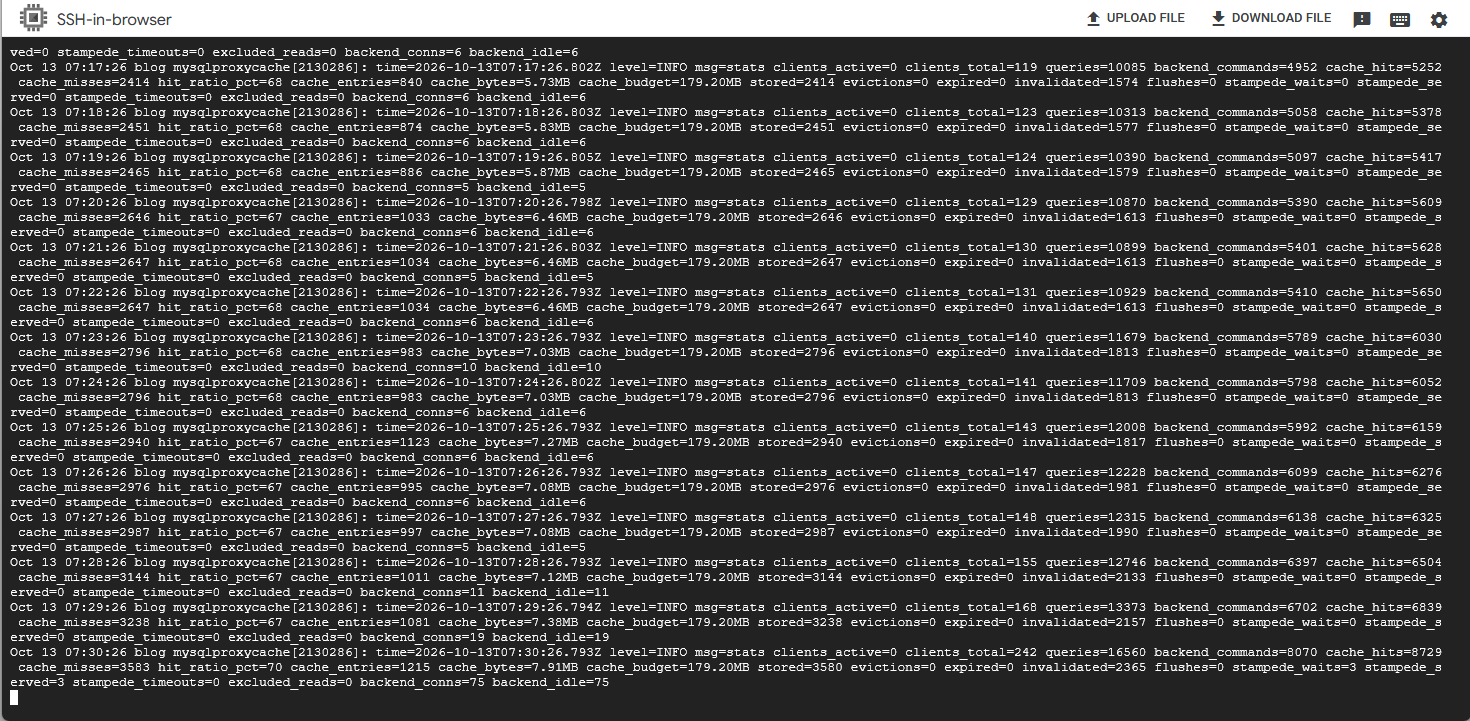
MySQLProxyCache running in a Ibexa 4.6 platform, serving more than 140 queries per second, 80% from cache
MySQLProxyCache Enterprise
door Carles Mateo
 Linux
Linux Databases
Cache
MariaDB
MySQL
Performance
Enterprise Edition. A high performance in-memory cache written in Go that transparently sits between MySQL and your programs, speeding them dramatically, without any code change
MySQLProxyCache — Make MySQL answer faster, without changing your application
mysqlproxycache 1.8, by Carles Mateomysqlproxycache is a caching proxy written in Go that sits between your application and your MySQL server.
Your application connects to it exactly as it connects to MySQL.
Results of repeated queries come straight from memory.
Your MySQL server only does the work that actually needs a database.
This is the new release written in Go, evolved from the previous MySqlProxyCache written in Java in 2010.
Why mysqlproxycache
No code changes
Change the host and port in the connection settings of your applications, and that's all.No new library, no cache keys to design, and no "remember to clear the cache" calls scattered through your code. PHP, Java, Python, Node.js, Go... the `mysql` command line: anything that talks to MySQL talks to mysqlproxycache.
So if your e-Commerce goes slow, you don't need time and developers refactoring all your code to add cache in Redis, you can just plug in mysqlproxycache and benefit from instant speed.
Also you're protected from "cache stampede" problems (many connections requesting the same, non cached data, at the same moment), which regular cache implementations do not cover.
Connect your application to MySQLProxyCache without service interruption.
Huge gains from JOINs and ORDER BY SELECTs
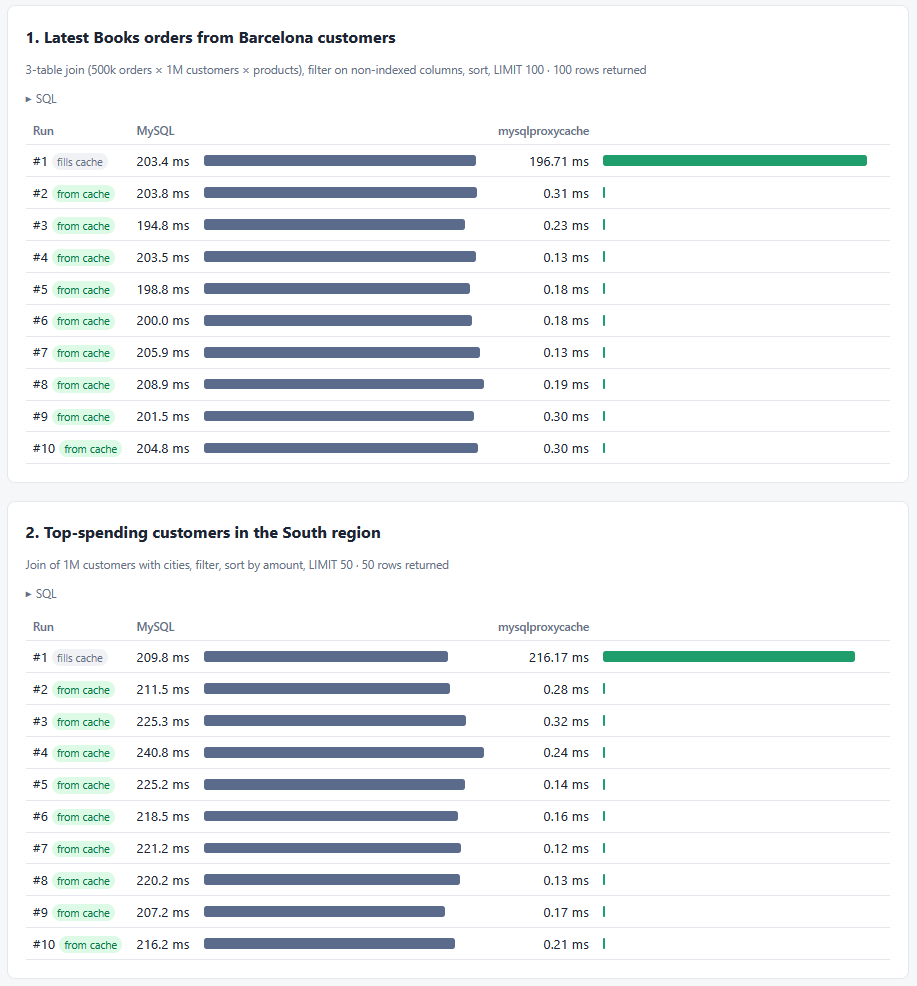
With mysqlproxycache after the first query, the next ones in memory are super-fast.This is specially impressive on heavy queries like joins, that are repeated in your websites and CMS.
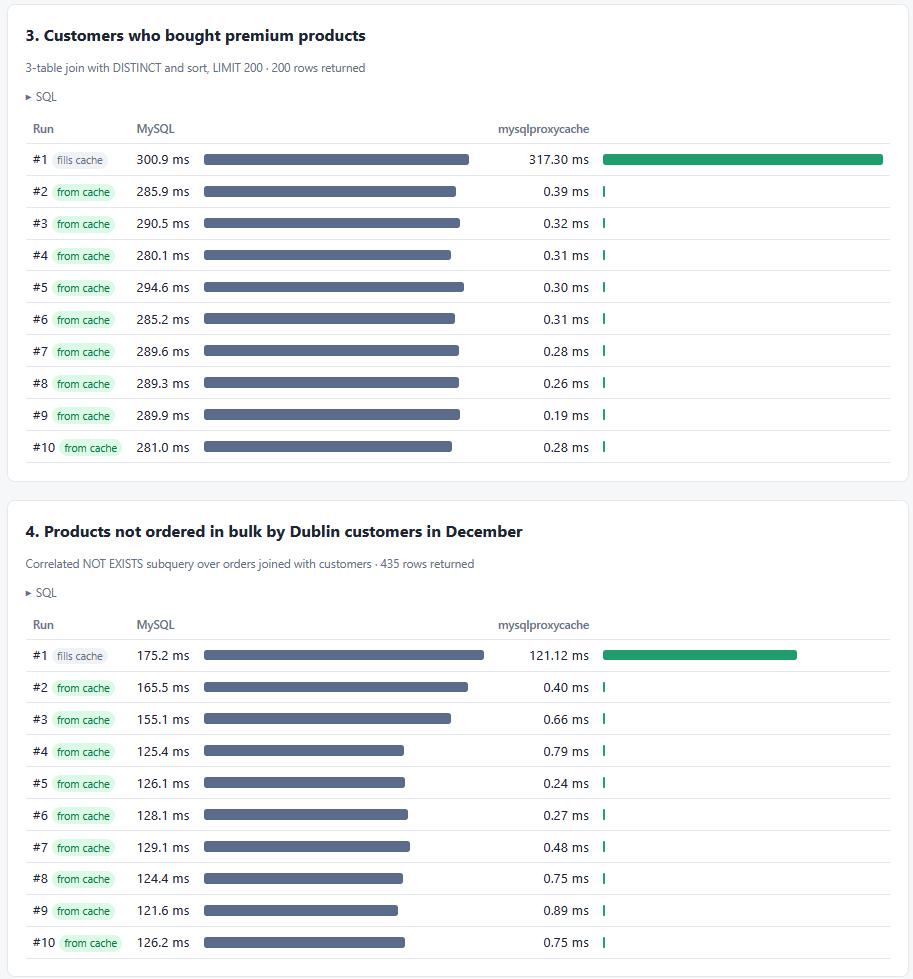
Imagine a Join query that takes 100 seconds to be processed by MySQL. Image 20 requests at the same time. Those 20 requests to your MySQL server would make it tremble for few minutes, however mysqlproxycache makes only one request to the MySQL server.
After the data is cached, next requests take milliseconds are server by mysqlproxycache in less than 1 second, while MySQL would still need close to 100 seconds per each request.
For repeated heavy queries, like for consolidating accounting, that may take one hour to be processed by MySQL server, after the first one, mysqlproxycache will serve the next ones in les than 1 second (if there were no queries updating the data).
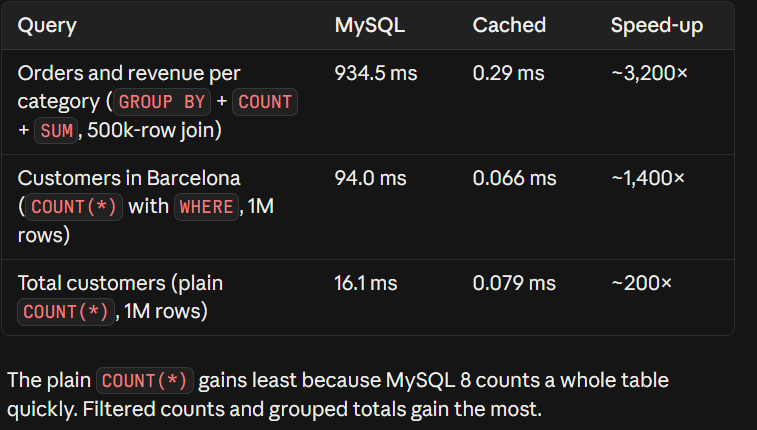
In our battery of tests, which consists in 10 queries to MySQL and to mysqlproxy cache, speeds of mysqlproxycache serving the data x3,000 times faster than MySQL are normal.
Huge speed increase in CMS page serving
WordPress, Drupal, PrestaShop, Ibexa... all can benefit from the super speed of the cached queries.Scenarios where there are few writes, and many reads, like web pages, posts, content tree... are the most benefited from mysqlproxycache.
Less load on MySQL
Most applications ask the same questions to the database over and over: product pages, menus,settings, user profiles, countries, translations. MySQLProxyCache answers repeated questions from
memory, so they never reach MySQL. That frees MySQL's CPU and disk for the
queries that need it, and can delay or avoid a costly hardware upgrade or Cloud services, and save your business from servers crashing and from degraded service due to slow speed of MySQL.
Answers from memory
A cached result goes back to your application directly from RAM. MySQL doesn't parse, plan or execute the query again, and no disk is read.Never serves outdated data after a change
Caching is easy. Caching correctly is the hard part, and it's wheremysqlproxycache puts most of its work:
- Automatic invalidation. When an `INSERT`, `UPDATE`, `DELETE`, `TRUNCATE` or schema change touches a table, every cached result that used that table is dropped immediately, before the next read can see it.
- Understands your database structure. It knows about views, foreign keys with cascades and triggers. A change to one table also drops the cached results of the tables and views that depend on it.
- Transaction-aware. Inside a transaction, your application always talks to MySQL directly. When the transaction commits, the affected tables are cleared from the cache again.
- Safe against race conditions. A query that was running while a write happened is never stored, so old data can't slip back into the cache.
Knows what must never be cached
mysqlproxycache reads every SQL statement with a full MySQL parser. Resultsthat could change on their own, such as queries using `NOW()`, `RAND()` or any
other function, stored procedures, variables, or locking reads (`FOR UPDATE`),
are always sent to MySQL. Writes are never cached.
Certain deterministic safe functions like `COUNT()` are cached for performance and invalidated if the table changes. (you can disable the caching of these functions with cache_deterministic_functions=0 in the config file)
users can ask for the same data at the same moment. Without protection, all
of those queries hit MySQL at once. That is the classic "cache stampede" that
brings databases down at the worst possible time.
mysqlproxycache sends only the first one to MySQL. The others wait a few
moments and get the same answer from memory. In our tests, 200 identical
queries arriving at the same moment reached MySQL exactly once.
under heavy load or briefly unavailable. At boot, mysqlproxycache waits for
MySQL to come up instead of failing.
opens more only when needed. Clients whose queries are all answered from the
cache don't use a MySQL connection at all.
the oldest cached results first when it needs room. To protect your server,
it refuses to start with a limit above 95% of the machine's RAM.
your server. You can cap the number of cores it uses, so it shares the machine
nicely with MySQL or your application.
- Install in one command; it runs as a hardened systemd service under its
own unprivileged user.
- One small, commented configuration file.
- Clear logs and periodic statistics: hit ratio, memory used, connections
and stampede activity.
- A `-check` command validates your configuration and your MySQL login before
you go live.
Stampede protection
When a popular cached result expires, or a traffic spike arrives, hundreds ofusers can ask for the same data at the same moment. Without protection, all
of those queries hit MySQL at once. That is the classic "cache stampede" that
brings databases down at the worst possible time.
mysqlproxycache sends only the first one to MySQL. The others wait a few
moments and get the same answer from memory. In our tests, 200 identical
queries arriving at the same moment reached MySQL exactly once.
Keeps answering when MySQL is busy or restarting
Results that are already cached are served from memory, even while MySQL isunder heavy load or briefly unavailable. At boot, mysqlproxycache waits for
MySQL to come up instead of failing.
Fewer connections to MySQL
mysqlproxycache keeps a pool of ready, authenticated connections to MySQL andopens more only when needed. Clients whose queries are all answered from the
cache don't use a MySQL connection at all.
Predictable memory use
You choose the maximum memory. mysqlproxycache stays within it and releasesthe oldest cached results first when it needs room. To protect your server,
it refuses to start with a limit above 95% of the machine's RAM.
Uses all your CPU cores
Built in Go, mysqlproxycache serves many clients in parallel on every core ofyour server. You can cap the number of cores it uses, so it shares the machine
nicely with MySQL or your application.
Simple to run
- One static binary with no dependencies, built for Ubuntu 26.04 LTS, Ubuntu 24.04 LTS and Debian 13 and Debian 12.- Install in one command; it runs as a hardened systemd service under its
own unprivileged user.
- One small, commented configuration file.
- Clear logs and periodic statistics: hit ratio, memory used, connections
and stampede activity.
- A `-check` command validates your configuration and your MySQL login before
you go live.
CMS, like WordPress, Drupal or Ibexa benefit from MySQLProxyCache?
Yes, CMS are the most benefit from using MySQLProxyCache.
Any project that creates contents that are read many times gets instant huge speed increase by using MySQLProxyCache.
Any project that paginates data (like WordPress) runs the same queries all the time. With MySQLProxyCache results come instantly.
Enable or disable log queries without restart
With MySQLProxyCache you can just enable or disable logging the SQL queries, without restarting.
You'll get the timestamp, the query, and the time it took for MySQL to answer or if it was served from MySQLProxyCache's memory.
This way you can troubleshot slow queries without having to restart the MySQL server.
This is really helpful for SRE (Site Reliability Engineering) when investigating issues.
Features at a glance
- Drop-in MySQL protocol proxy | ✔ |
- Use TCP/IP or Unix sockets (faster), both sides | ✔ |
- Automatic cache invalidation on writes | ✔ |
- Aware of views, cascading foreign keys and triggers | ✔ |
- Transaction-safe | ✔ |
- Never caches functions, procedures or writes | ✔ |
- Stampede protection with configurable wait time | ✔ |
- Optional expiry time (TTL) for cached results | ✔ |
- Memory limit with oldest-first eviction | ✔ |
- Connection pool to MySQL | ✔ |
- Multi-core | ✔ |
- `caching_sha2_password` and `mysql_native_password` logins | ✔ |
- Prepared statements, multi-statements, `LOAD DATA LOCAL` passed through | ✔ |
- systemd service with security hardening | ✔ |
- Log the SQL queries | ✔ |
- Logrotate config for the /var/mysqlproxycache/ logs | ✔ |
- Statistics in the logs and with SQL queries | ✔ |
Can I use it with Docker Containers or K8s?
Yes. In fact in most of our projects we use mysqlproxycache inside a Docker Container, and all the tests are conducted in Containers running Ubuntu 26.04 LTS, Ubuntu 24.04 LTS and Debian 13.
Compatibility
- Server OS: Ubuntu 26.04 LTS, x86_64, Ubuntu 24.04 LTS and Debian 13 and 12. We focus on these platforms only.
- Host: Physical servers, VMs/instances in the cloud, Docker Containers and K8s (Kubernetes)
- Database:
- MySQL 9.7 (tests certified with 9.7.4).
- MySQL 8.4 (tests certified with MySQL 8.4.13).
- MySQL 8.0 (tests certified with MySQL 8.0.34 Community Server and MySQL 8.0.46-0ubuntu0.24.04.4).
- MariaDB 10.11
- MariaDB 11.4
- MariaDB 11.8
- Clients: any MySQL driver or tool using the standard MySQL protocol.
mysqlproxycache works best when:
- your application reads much more than it writes;
- the same queries are repeated by many users or many page views;
- the writes to your data go through your application, and so through
mysqlproxycache.
Good to know before you buy:
- If other programs write to MySQL directly, bypassing the proxy, set a short expiry time (TTL) so cached results refresh on their own.
- Connections between your application and mysqlproxycache are not encrypted
(no TLS). Run it on a private network or on the same server as your application.
- Queries that contain functions, such as `NOW()`, `RAND()`, `UUID()` are always sent to MySQL and never cached.
Is it right for you?
mysqlproxycache works best when:
- your application reads much more than it writes;
- the same queries are repeated by many users or many page views;
- the writes to your data go through your application, and so through
mysqlproxycache.
Good to know before you buy:
- If other programs write to MySQL directly, bypassing the proxy, set a short expiry time (TTL) so cached results refresh on their own.
- Connections between your application and mysqlproxycache are not encrypted
(no TLS). Run it on a private network or on the same server as your application.
- Queries that contain functions, such as `NOW()`, `RAND()`, `UUID()` are always sent to MySQL and never cached.
- Queries like `COUNT(*)` are cached (an insert or write to the table invalidates the cached result. The caching of these functions can be disabled)
- Queries like `USE` are directly served from cache when MySQLProxyCache already knows the database.
- The `mysqlproxycache` program for Ubuntu 26.04 LTS (x86_64), Ubuntu 24.04 LTS and Debian 13
- Installer and uninstaller
- Ready-to-use systemd service (it can be ran in Docker Containers without systemd too)
- Commented configuration file
- Complete user guide: installation, every setting, troubleshooting
What you get
- The `mysqlproxycache` program for Ubuntu 26.04 LTS (x86_64), Ubuntu 24.04 LTS and Debian 13
- Installer and uninstaller
- Ready-to-use systemd service (it can be ran in Docker Containers without systemd too)
- Commented configuration file
- Complete user guide: installation, every setting, troubleshooting
- New releases for free, for a year
- License agreement and third-party notices
- Right to use in one server (by server refers to one physical server, or a single VM, or a single Docker Container). For multi-server licenses contact support.
Bash:
Then point your application at port 3307 instead of 3306 (the port can be configured), or use Unix Sockets.
Get started in five minutes with no downtime
Bash:
unzip mysqlproxycache-1.8-linux-amd64.zip
cd mysqlproxycache-1.8-linux-amd64
sudo ./install.sh
sudo vi /etc/mysqlproxycache/mysqlproxycache.conf
sudo systemctl start mysqlproxycache
Then point your application at port 3307 instead of 3306 (the port can be configured), or use Unix Sockets.
Unix sockets can be used for the client side (you application) and/or for the MySQL server.
License is per server and grants right to receive any new releases for a year.
*mysqlproxycache is developed by Carles Mateo.
Bijlagen
- MySqlProxyCache v.1.8 for Ubuntu 26.04 LTS, 24.04 LTS and Debian 13 64 bits installer (4.5 MB)
- User Guide (50.4 KB)
€5.000
Licentie-informatie
- Licentietype Commercieel
- Downloaden van toekomstige versies/updates Een jaar
- Betalingsfrequentie van de licentie Eenmalige betaling