Webcache for Ibexa 4
por Carles Mateo
 Drupal modules
Cache
Ibexa
OSS
Performance
Drupal modules
Cache
Ibexa
OSS
Performance
WebCache for Ibexa 4.6
Full-page cache for Ibexa DXP 4.6: faster pages, lighter servers, content that is always up to date.
WebCache for Ibexa stores the finished HTML of your public pages and serves it to the next visitors in milliseconds, without running the full Ibexa stack again. When an editor publishes, every page showing that content is cleared and the new version is generated at once. Your visitors get speed, and your editors never have to think about the cache.
It works with every edition and every 4.6.x release of Ibexa DXP (OSS, Headless, Experience and Commerce), on one server or a cluster, for one site or many.
Why WebCache for Ibexa
- Pages in milliseconds. Cached pages are answered before Ibexa routing, security and the content repository even start.
- Lower hosting costs. Far less PHP, database and search-engine work per visit, so the same servers handle much more traffic.
- Always fresh after publishing. Publishing clears the content's own page and every page that shows it: section listings, home page teasers, menus and embeds, on every site and in every language. The content's pages are then rebuilt straight away.
- Editors stay in control. A cache manager in the Ibexa back office shows every cached page, and lets editors clear it or mark it "never cache" with one click.
- Built for multi-site and multilingual. Supports 10 or more domains and all your languages. Each site and language has its own cache entries.
- Ready for clusters. Several Ibexa servers share one cache through Redis or a shared disk, and a change made on one server applies to all of them.
- Safe under traffic peaks. When a popular page expires, only one request rebuilds it. Every other visitor gets the previous copy or waits a moment, so expiry never causes a load spike.
- Plays well with your CDN. Works alone or in front of Varnish, Fastly or Cloudflare, and keeps the cache tags they use for purging.
Features
Storage of your choice- Redis: set the server and port (password, database and Sentinel supported).
- Disk: set a folder, either local or a shared mount (NFS, EFS…) for several servers.
- Pages are compressed and written atomically, so nobody ever sees a half-written page.
- Default TTL from the back office: Never expires, 10 minutes, 60 minutes, 1 day, 1 week or 1 month.
- A different TTL per site (siteaccess).
- A different TTL per page, from the back office or from a simple "Cache TTL" field in the content form.
- When a page expires, the next visit rebuilds it automatically.
Exactly the right pages are cached
- Only public pages for anonymous visitors (GET) are cached. Logged-in users, personal pages and form submissions (POST) are never cached.
- Login, user profile, cart, checkout and API URLs are excluded out of the box, and you can add your own.
- "Never cache this page" can be set with one click from the cache manager, per URL or for a page in all sites. It can also be a checkbox in the content form.
- Extra URL parameters such as ?utm_source=… or ?test=1 are ignored, so they don't create duplicates.
- Search pages are never served from the cache (rule included in the supplied configuration). Paginated listings (?page=2) can be cached page by page and are refreshed when new content is published.
Back office cache manager
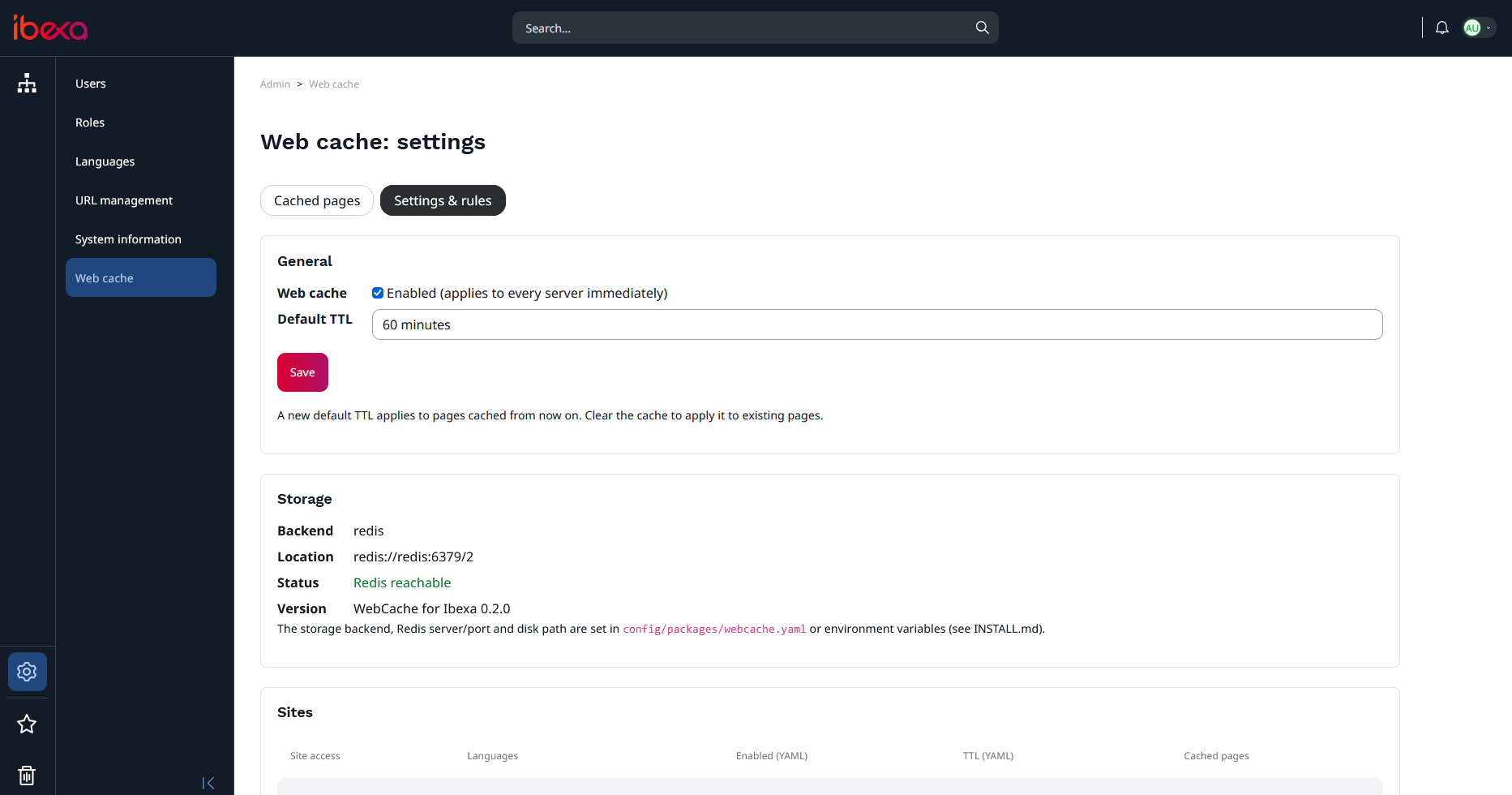
In Admin > Web cache:- All cached pages, grouped by site (domain/siteaccess), with the number of pages and total size per site.
- For each page: URL, date and time it was cached, TTL, expiry date and HTML size. It also shows the content it belongs to, its cache tags and the stored headers.
- Clear one page, a selection, a whole site, or everything.
- Never cache this page in one click.
- Settings page: enable or disable the cache, the default TTL, a storage health check, and the list of page rules.
- A Web cache tab on every content item shows its cached URLs and lets editors set its TTL or turn its caching off.
- Permissions (view / clear / configure) are assigned to roles like any other Ibexa permission.
For developers and operations
- Console tools to install, check status, clear (all, by site, URL, content or tag), clean up, and pre-load pages (for example from a sitemap).
- An X-WebCache response header (HIT, MISS, STALE, or the reason a page was not cached) makes diagnosis easy.
- Optional background regeneration with Symfony Messenger workers.
- The site keeps working even if the cache storage goes down.
How it works
- A visitor asks for a page. If a fresh copy is in the cache, it is sent immediately.
- Not cached yet, or expired? Ibexa renders the page once, and WebCache stores it for the next visitors. Only one request does this work, even under heavy traffic.
- An editor publishes. WebCache clears every page that shows the content, on every site, and rebuilds the content's pages right away. CDN purges keep working as before.
Requirements
Ibexa 4.6.x: OSS, Headless, Experience or CommercePHP: 7.4 to 8.3
Database: MySQL, MariaDB or PostgreSQL (your Ibexa database)
Cache storage: Redis 5+ (ext-redis or Predis) or a writable folder (shared between servers in a cluster)
Quality
Every release is tested on a real Ibexa DXP 4.6 cluster (two servers behind a load balancer, shared database and Redis), with both Redis and disk storage, three sites on two domains and two languages, plus automated unit tests.Release 0.2.0 passed all 69 end-to-end checks and 47 unit tests.
What you get
- The WebCache for Ibexa package (a Composer-ready zip).
- Step-by-step installation guide.
- Ready-to-use configuration file with every option explained.
- Changelog.
Installation in about 10 minutes
- Add the package with Composer.
- Enable the bundle and copy the two configuration files.
- Set Redis or a disk path.
- Run one command to create the tables.
- Done: open Admin > Web cache in the back office.
FAQ
Do I still need Varnish or a CDN?No. WebCache works on its own. If you already use Varnish, Fastly or Cloudflare, keep them: WebCache sits behind them as a fast origin cache and keeps their purge tags working.
What do logged-in users see?
What do logged-in users see?
Always the live site. Pages are never cached for, or served to, logged-in users.
How quickly do editors' changes appear?
How quickly do editors' changes appear?
Immediately after publishing. The affected pages are cleared and the content's pages are rebuilt at once.
Does it work with several servers?
Does it work with several servers?
Yes. All servers share the same cache through Redis or a shared disk. Settings and clears apply to every server at once.
Can I exclude a page?
Can I exclude a page?
Yes. Click "Never cache this page" in the cache manager, set it on the content item, or exclude URL patterns and content types in the configuration.
What about search pages?
What about search pages?
With the supplied configuration, search results are never served from the cache, so visitors always get current results. Paginated listings can be cached page by page and are refreshed on publish.
What happens on a traffic spike when a page expires?
What happens on a traffic spike when a page expires?
Only one request rebuilds the page. The others get the previous copy for a few seconds, or wait briefly for the new one. Your servers don't get hit with the same work hundreds of times.
Ibexa and Ibexa DXP are trademarks of Ibexa AS. WebCache for Ibexa is an independent product and is not affiliated with or endorsed by Ibexa AS.