WordPress PHP Firewall
von Carles Mateo
(5.00)
 WordPress plugins
Security
abusive
Crawlers
DoS
Exploits
Firewall
Forensics
offending IPs
patterns
plugin
Security
WAF
WordPress
xmlrpc
A high speed WordPress plugin, that protects your server from hack attempts, DoS attacks, bots, exploits, vulnerabilities, abusive crawlers and blocks them before WordPress loads, saving your server's precious resources
This plugin for WordPress automatically blocks IPs trying exploits to your server and attempting to hack using wp-login, xmlrpc, attempting to post fake comments, DoS attacks...
It detects and blocks using PHP, at an early stage of WordPress loading, so it saves a lot of CPU from bad requests. It is optimised for very low memory usage and very fast execution.
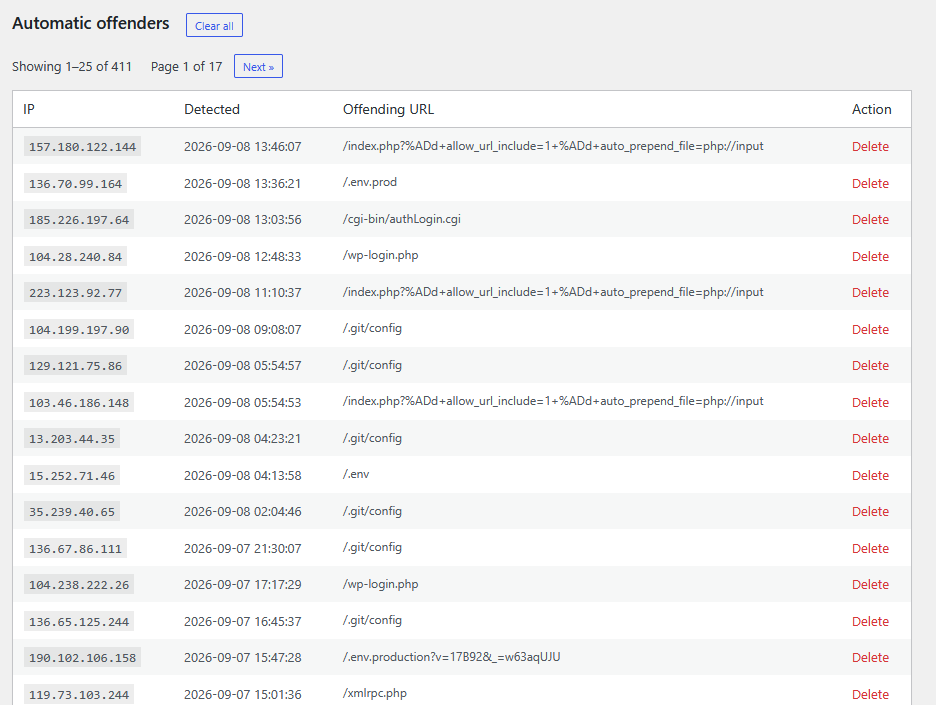
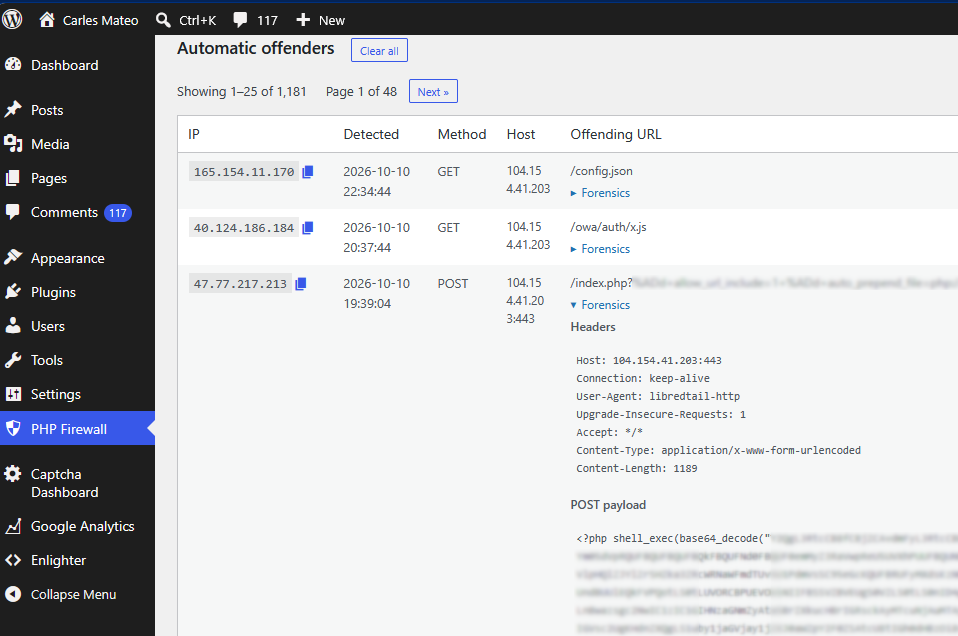
It stores the offending IP Addresses and it doesn't allow them to waste more resources of the server.
This plugin is created by Carles Mateo with more than 30 years of experience with security and more than 20 with WordPress to protect sites from typical attacks and vulnerability scans that make the server go slow and crash.
Dangers of the servers in Internet
You don't see it, but your sites are currently receiving several attacks every single second.
A regular site from our customers, with 1,000 visitors per day, uses to be protected from more than 100,000 malicious requests the first month that PHP Firewall is enabled.
In many occasions the bots trying to hack your site, post Spam comments, or aggressively indexing your site, have the collateral damage that cause collapse to your server performance, causing the server to server the pages slowly to legit users, and in some occasions it causes the servers to crash, and expenses in outgoing (egress) Internet traffic.
PHP Firewall protects your sites
The best IP Firewall is at your provider's level, so before the attacks reach your server, but it blocks by IP Addresses, not attacking patterns (this is performed by the WAF).
After this, the best IP Firewall is to block the connections with ufw or iptables (Firewall in your server at Linux level).
Both IP blocking methods require many hours every month of dedicated System Administrators analysing the logs, and root access, and applying the bans.
Using PHP Firewall plugin and blocking at PHP level is the cheapest, easiest, fastest and safest option. And also the plugin is a WAF (Web Application Firewall), which analyses requests to detect attacks and blocks IP Addresses trying well known attacks. Even if your server is vulnerable to the built-in attacks, they would be blocked.
PHP Firewall for WordPress plugin has rate-connection detectors, which will detect and block IP Addresses making too many requests to the server (you can customise the volumes, and if they are GET or POST requests), or requests that should not be done, like attempts to login per hour, to post comments...
So this Software protects your server from wasting CPU and memory for attending malicious attacks from hackers or bots.
This plugin checks the connections that arrive to the server, detects the abusive patterns or rate-limits and blocks the offending IPs automatically, before WordPress loads completely using few memory.
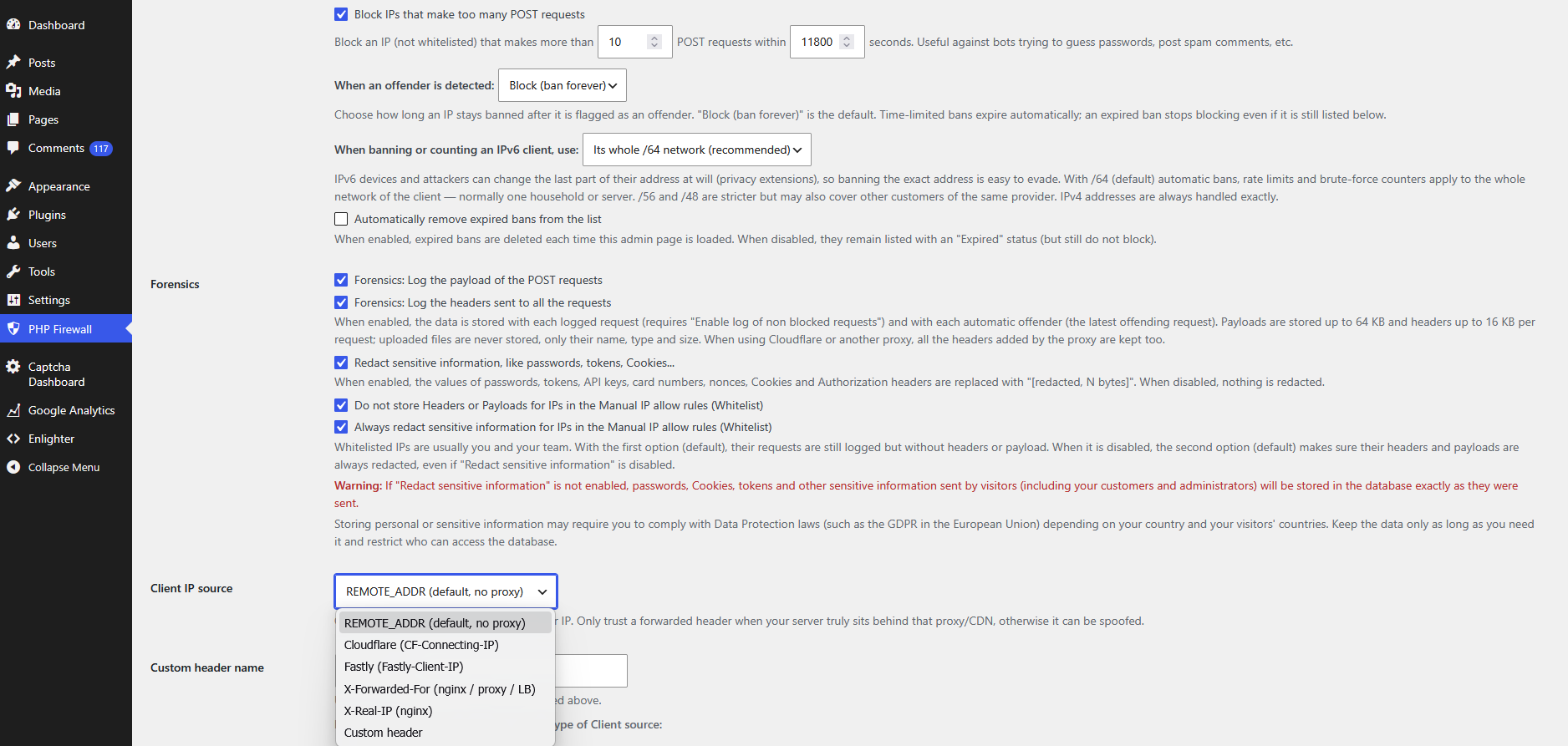
You can choose permanent ban, or ban for several periods like 1 hour, 2 hours, 4 hours, 1 day, a week, a month or a year...
Very powerful for stopping attacks and forensics
PHP Firewall is very powerful, a tool lovely for System Administrators, and for Forensics too. If you want to investigate, it can help you to detect, troubleshoot, see the patterns of the attacks, see IPs doing more requests and what they request... and keep your sites super well protected with a minimum effort.
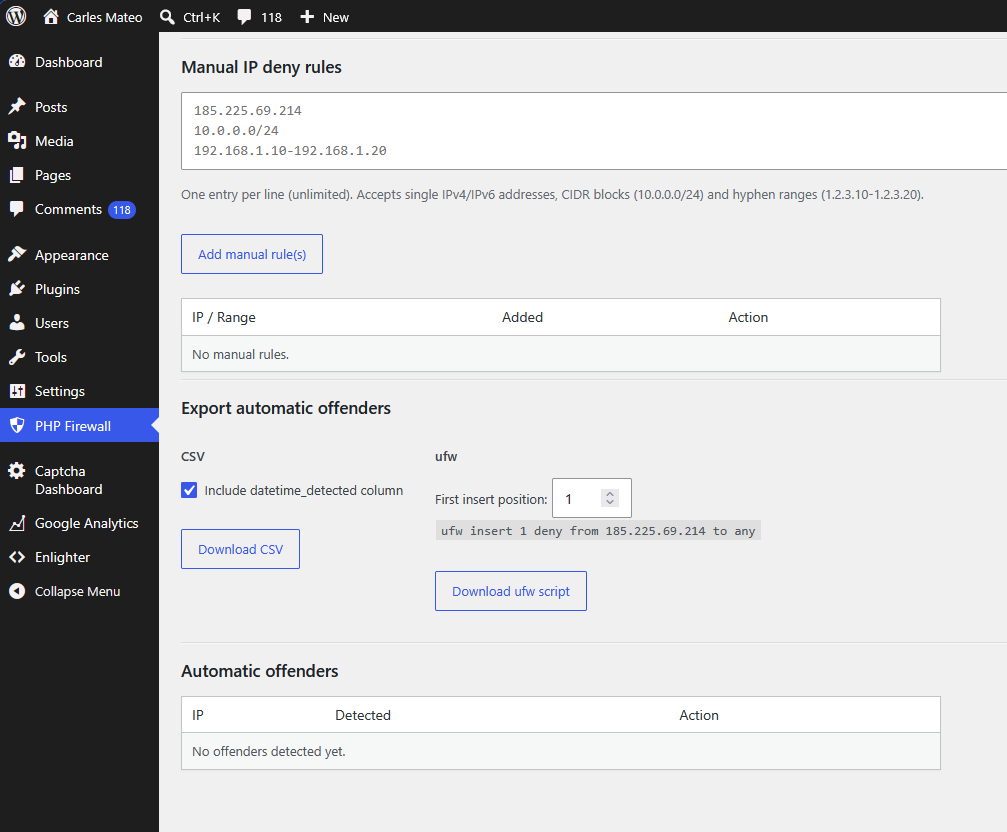
You can also add your rules to block certain patterns and you can block individual IPs and IP ranges.
For IPv6 it allows to block all the variable parts of the IP (the device part, to the right of the IP IPv6).
But if you are a business owner or a non-technical user, and you just want something plug and play, that you install and stops most of the attacks easily, immediately, without you doing anything, your site will be protected from most abusive connections as you install it.
Even if you don't know, your server is likely getting thousands of malicious requests per day. Degrading the speed of the response of your site for the real users, and putting your server at risk of being hacked or malfunctioning (like MySQL becoming degraded and becoming extremely slow, disk getting full due to extensive logs).
Carles Mateo's PHP Firewall plugin for WordPress is a very powerful to use plugin, made to solve performance problems because the avalanche of rogue connections causing problems to the server performance and the speed of response and page loading for the legit users or generating expenses in Internet traffic (some Cloud providers charge you per outgoing Internet usage of your servers).
The price of the license it's a single one time payment for one WordPress installation (up to 10 domains in WordPress multi-site), and allows you to receive support and to download free updates for a year. After a year the software continues to work and you don't need to renew it every year, although in order to receive new versions and to have support after a year, you require to renew the license.
If you are an agency, contact support for volume licencing.
The plugin also allows you to export the offending IP addresses as a CSV file or as a shell script that will add to Ubuntu firewall or any other Firewall Software the offending IPs.
The software allows you to get immediate protection with no technical background and also if you're a powerful tech user it's useful for troubleshooting, analysing attacks, reveal which IP Addresses do more requests per day, see the Payload of the POST requests, and detecting attack patterns at an early stage so you can block them before they affect your business.
CDN support
PHP Firewall integrates perfectly with the leader CDNs:
- Akamai
- Cloudflare
- Cloudfront
- Fastly
And also with your own proxy, Varnish, and nginx.
WordPress multi-site
PHP Firewall for WordPress is fully compatible with WordPress multi-site.
Only main admins can manage the configuration of PHP Firewall, not the sub-sites admins.
The protection is global, at network level, for all the sites in the Server.
In the dashboard you can see what site are being requested, very useful for multi-site and to detect if requests are coming to the server from other domain names (normally DNS configuration errors at your side).
The license allows to run the plugin with up to 10 sites. If you host more sites on the same server, please contact support for pricing.
Compatibility
Compatible verified with: WordPress up to v. 7.1.3 and lower versions up to WordPress 6.7.
Code is PHP 7.4 (verified compatible with PHP up to 8.5).
You can watch the video on the left and read an article explaining how to protect your site using PHP Firewall WordPress plugin v.1.0.8. Actual versions such 1.6.6 are much more powerful.
Contact support for doubts or a live demo.
Anhänge
- PHP WordPress Firewall plugin v. 1.12.1 (75.7 KB)
500€
/Jahr
Lizenzinformationen
- Lizenztyp Kommerziell
- Download künftiger Versionen/Updates Ein Jahr
- Zahlungshäufigkeit der Lizenz Jährlich
Änderungsprotokoll
Dieses Änderungsprotokoll ist nur auf Englisch verfügbar. Englische Seite ansehen
= 1.12.1 =
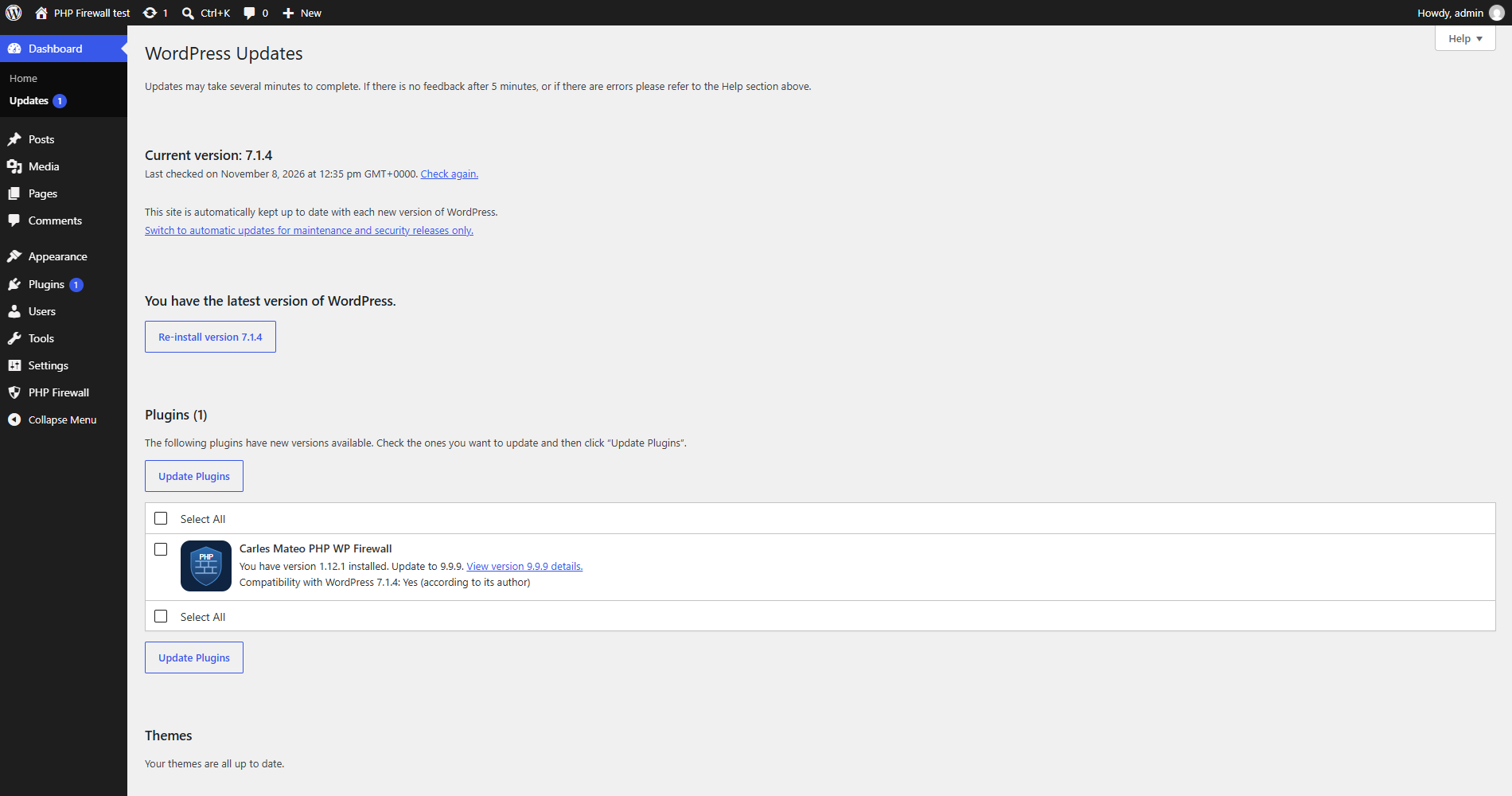
* The plugin icon is now shown in Dashboard → Updates and the banner in the
View details pop-up. They are drawn by the installed version, so they appear
from the next update on.
= 1.12.0 =
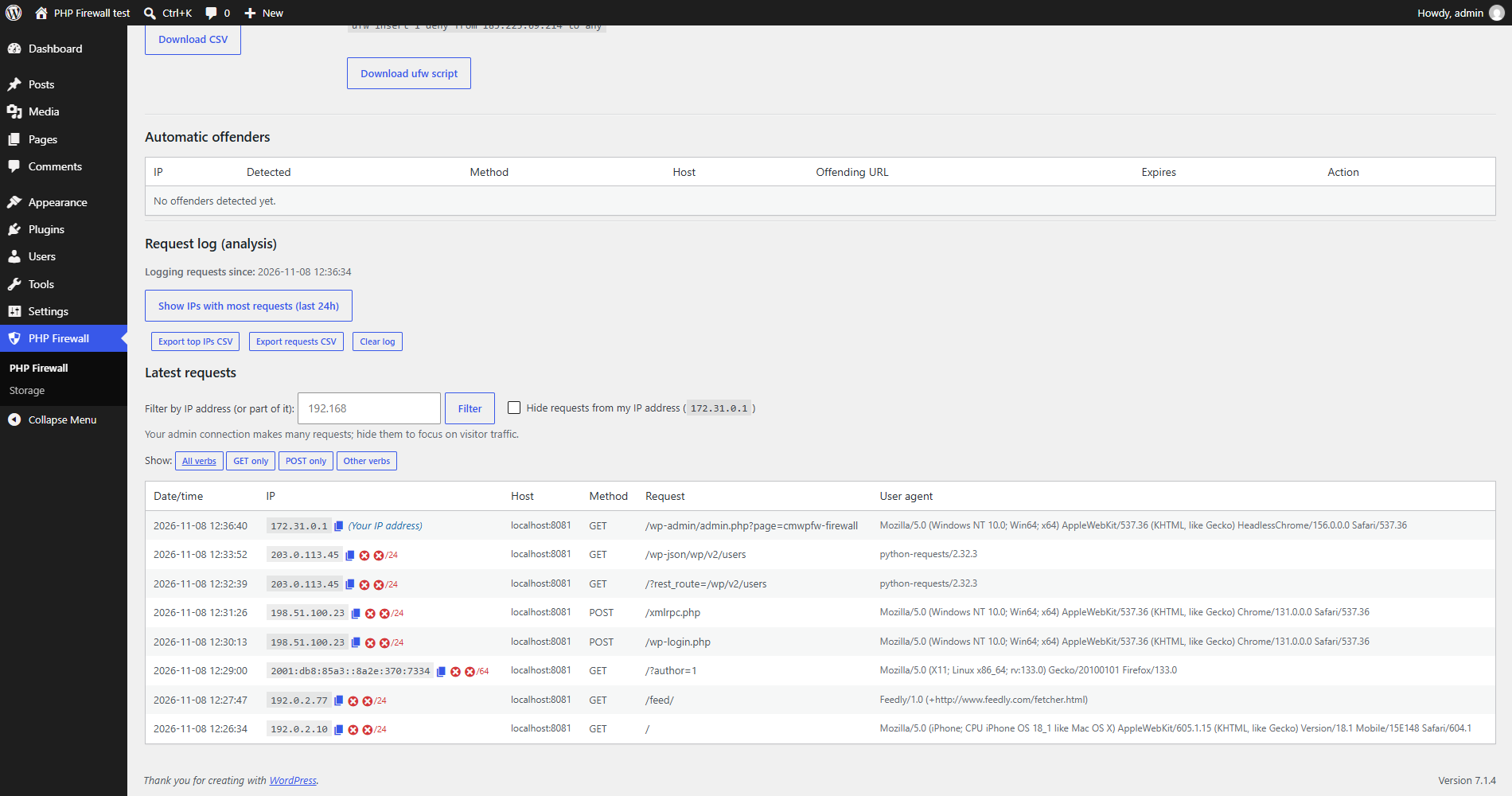
* Latest requests: two new icons next to each IP to ban it, or its whole
network (Class C /24 for IPv4, /64 for IPv6), as a manual deny rule, after a
confirmation. CDN / trusted-proxy IPs, whitelisted IPs and your own IP are
refused.
* New built-in patterns: /cpresources/, /actions/users/session-info,
^/core/modules/system/, ^/node/1.json, /language/en-GB/en-GB.xml and
/jellyscan-ctrl-.
= 1.11.1 =
* Forensics now logs the payload of POST, PUT, PATCH and DELETE requests.
Multipart bodies sent with PUT, PATCH or DELETE are not stored, only a note
with their size.
* The payload options now say they apply to POST/PUT/PATCH/DELETE.
= 1.11.0 =
* New Custom payload patterns: one substring per line (unlimited), a leading ^
means the payload starts with it. A match bans the IP (reason PAYLOAD-PATTERN).
* Payload patterns, built-in and custom, now scan POST, PUT, PATCH and DELETE
requests.
= 1.10.0 =
* New Storage page (PHP Firewall > Storage): for each firewall table, the
approximate rows and the database space used by data and indexes, the
reclaimable space and the total, with the request log first.
= 1.9.0 =
* New built-in URL patterns: base64_decode(, eval( and system(.
* New option "Block POST Payloads with these built-in patterns:" (enabled by
default), each pattern can be enabled or disabled: base64_decode(, eval(,
system(, exec(, shell_exec(, passthru(, proc_open(, popen(. A match bans the
IP (reason PAYLOAD-PATTERN). Whitelisted IPs and logged-in users who can edit
posts are never scanned; uploaded file contents are not scanned.
* The admin page checks disable_functions (46 recommended functions) and
ffi.enable (preload or 0) and recommends, in red, the php.ini settings when
they are not applied.
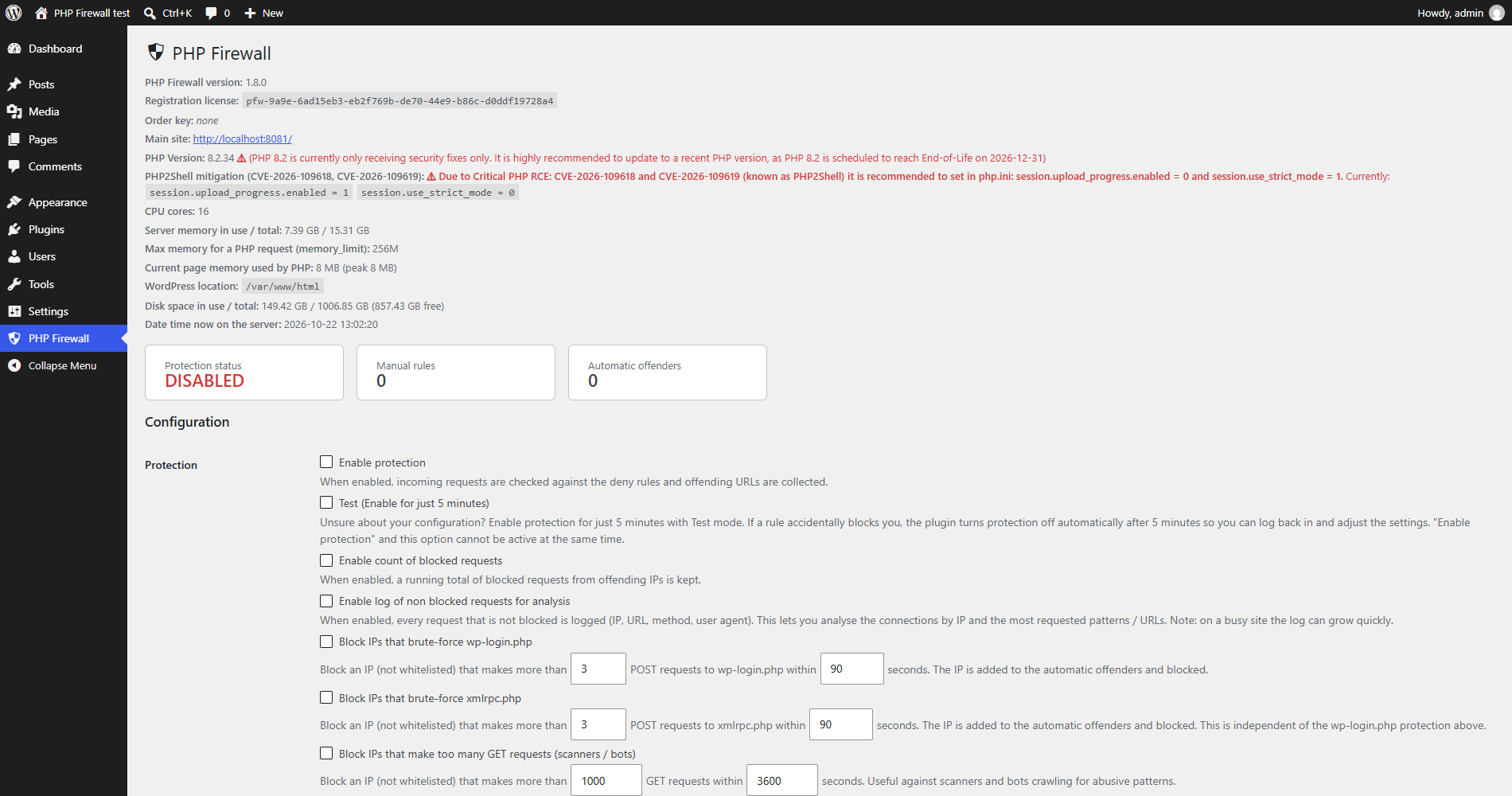
= 1.8.0 =
* New PHP2Shell mitigation check (Critical PHP RCE: CVE-2026-109618 and
CVE-2026-109619): the admin page shows in red, with the current values, when
php.ini is not set to session.upload_progress.enabled = 0 and
session.use_strict_mode = 1.
= 1.7.0 =
* Order key: if the plugin folder contains a file order_key.txt (shipped inside
the ZIP of your purchase), its value is read once, stored in the settings (so
it survives upgrades) and sent as order_key when the installation registers.
It is shown under the registration license as "Order key".
= 1.6.9 =
* IPs in Automatic offenders, Latest requests and Top IPs that belong to
Cloudflare, Fastly, Akamai, Amazon CloudFront or to your Trusted proxy IP
ranges are flagged with a warning badge, with a notice above the offenders.
This usually means the Client IP source is REMOTE_ADDR while a CDN connects
(banning that IP can block all your visitors), or the CDN / proxy IP was
compromised.
= 1.6.8 =
* New Client IP sources "Akamai (True-Client-IP)" and "Amazon CloudFront
(CloudFront-Viewer-Address)", with editable "Akamai IP ranges" (pre-filled with
the Akamai Origin IP ACL ranges) and "Amazon CloudFront IP ranges" (pre-filled
with the CLOUDFRONT ranges published by AWS). The header is trusted only when
the connection comes from those ranges.
* "How your client IP is detected" also shows the Akamai and CloudFront values.
= 1.6.7 =
* Automatic offenders now store why the IP was banned in two new fields:
reason_code (RATE-EXCEEDED for the rate limits and the wp-login / xmlrpc
brute-force protections, URL-PATTERN for URL pattern matches; PAYLOAD-PATTERN
reserved) and reason_for_ban (e.g. "rate: POST > 10/11800s").
* Offending URL now always keeps the latest URL requested, also for rate-limit
bans, displayed as "rate: POST > 10/11800s last url: /the/url".
= 1.6.6 =
* New built-in patterns: /config.yaml, /config.yml, /config.yml.back,
/config.yml.bck, /services.yaml, /services.yml, /parameters.yaml,
/%2f%2eaws%2fcredentials and /%2eenv (double-encoded probes), /.terraform/,
/terraform.tfstate, /c5_7alk07dml, /.env.local.php.back and /.env.local.php.bck.
* The copy-to-clipboard icon now always stays on the same line as the IP.
= 1.6.5 =
* No functional changes in the WordPress edition (version kept in step with the
Ibexa edition, which gains login brute-force protection and a GraphQL rate
limit).
= 1.6.4 =
* New Client IP source "Fastly (Fastly-Client-IP)" and new editable "Fastly IP
ranges", pre-filled with Fastly's published IPv4 and IPv6 ranges
(https://api.fastly.com/public-ip-list). The header is trusted only when the
connection comes from those ranges. Set req.http.Fastly-Client-IP = client.ip
in your Fastly VCL so visitors cannot spoof it.
= 1.6.3 =
* New built-in pattern: wp-content/plugins/wp2shell_
* The Automatic offenders list shows the Method (GET, POST...) of the offending
request.
= 1.6.2 =
* The Automatic offenders table now uses the full width of the page, like
Latest requests.
* A copy-to-clipboard icon next to the IP in the Automatic offenders and Latest
requests tables.
= 1.6.1 =
* The admin page shows the WordPress location and the disk space in use / total
of its partition, with a red "Low disk space on WordPress partition" alert when
less than 10% or less than 1 GB is free.
* The "Hide requests from my IP address" filter of the latest requests is now
remembered per user.
= 1.6.0 =
* New Host column in Latest requests and Automatic offenders: the host
requested by the client. Useful for WordPress Multisite and to detect a
server answering requests for several domains. Also in the request-log CSV.
* Registration now sends main_site (the site URL), wp_multisite and
wp_multisite_sites. The admin page shows "Main site:" under the
registration license (with the number of sites on Multisite).
* Multisite: the PHP Firewall page stays in the same place but is only
available to super admins; sub-site administrators could previously change
the network-wide firewall and read all the logs. The network registers once.
See docs/wordpress-multisite.md.
= 1.5.1 =
* New Forensics options for IPs in the Manual IP allow rules (Whitelist), both
enabled by default: "Do not store Headers or Payloads for IPs in the Manual IP
allow rules (Whitelist)" and "Always redact sensitive information for IPs in
the Manual IP allow rules (Whitelist)".
* New built-in pattern: ^/owa/auth
= 1.5.0 =
* New Forensics options (disabled by default): "Log the payload of the POST
requests" and "Log the headers sent to all the requests" (including the headers
added by Cloudflare or other proxies). The data is stored with the request log
and with the automatic offenders. Payloads up to 64 KB, headers up to 16 KB;
uploaded files only as name, type and size.
* New option "Redact sensitive information, like passwords, tokens, Cookies..."
(enabled by default). When disabled, nothing is redacted and passwords, Cookies
and tokens are stored as sent. Storing sensitive information may require
complying with Data Protection laws (such as the GDPR). See
docs/forensics-logging.md.
= 1.4.0 =
* IPv6 clients are now banned and counted by network prefix. Automatic bans,
the GET/POST rate limits and the wp-login / xmlrpc brute-force counters apply
to the client's whole /64 by default, so rotating the IPv6 interface ID
(privacy extensions) no longer evades a ban. New setting "When banning or
counting an IPv6 client, use": /64 (default), /56, /48 or exact address.
IPv4 is unchanged, and bans stored as exact addresses before the upgrade keep
working. See docs/ipv6-whitelisting-and-blocking.md.
= 1.3.1 =
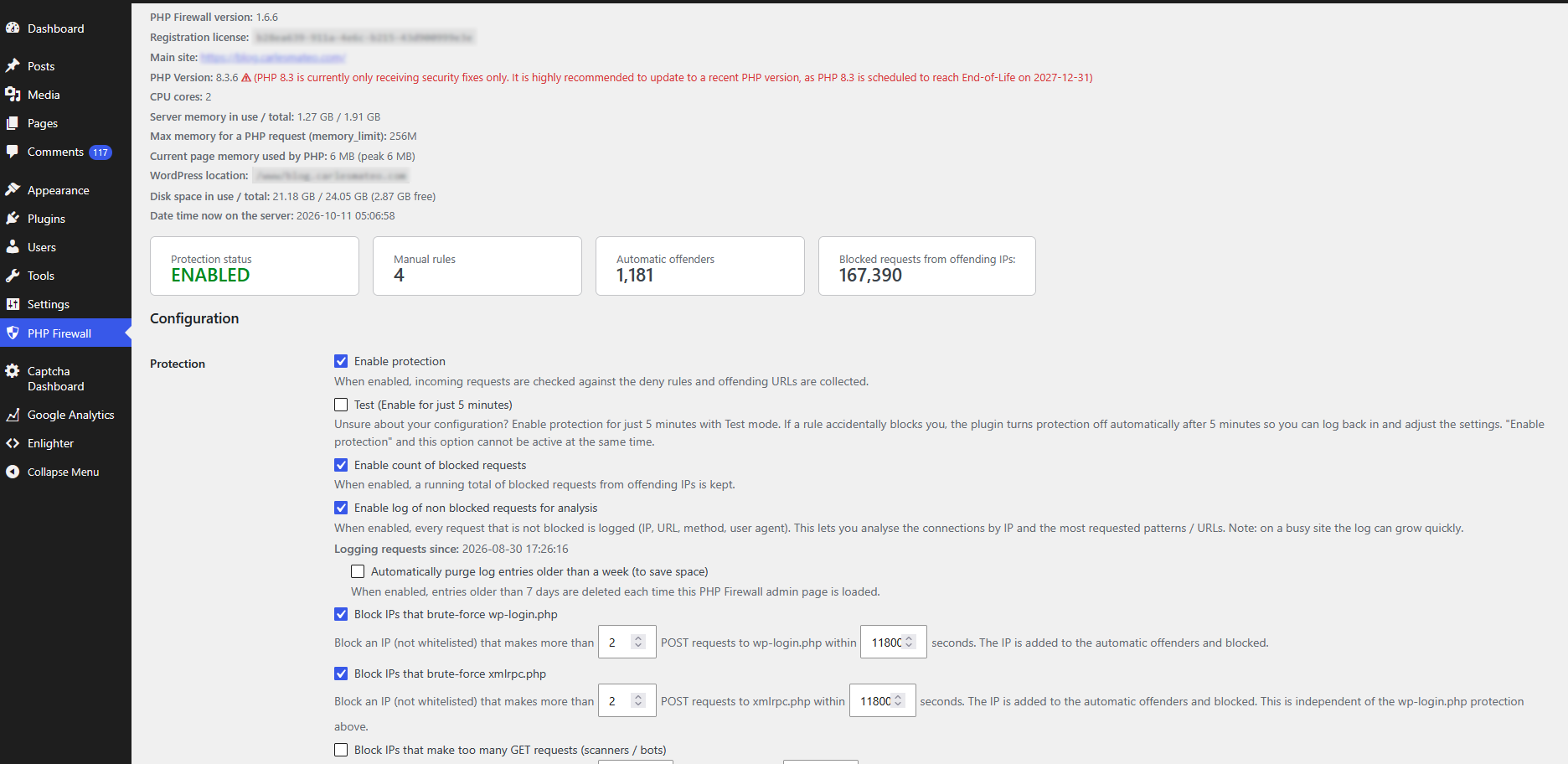
* Settings: shows the PHP version with an end-of-life / update warning, the
number of CPU cores (warning when only one core is detected), server memory in
use / total, the PHP memory_limit and the memory used by the current page.
* Detection: added /0vso2ticzbye, ^/?dns=, ^/remote/login, ^/dqgqoeCXckuwPtxov,
000000000000000000000, /chat/completions, ^/sendgrid.env, ^/wp-config.txt and
.strip.
= 1.3.0 =
* New "When an offender is detected" setting: keep the permanent ban (default) or
ban for 1h, 2h, 4h, 8h, 12h, 24h, a week, a month or a year. Time-limited bans
expire automatically and the IP is allowed again.
* New option "Automatically remove expired bans from the list" (default off);
when off, expired bans stay listed as "Expired" but no longer block.
* Automatic offenders table now shows an "Expires" column (Never / date / Expired).
* Note: ufw / CSV exports still emit permanent rules — a time-limited ban exported
to ufw becomes a permanent OS-level block.
= 1.2.1 =
* Request log: new checkbox "Hide requests from my IP address" (shows your admin
connection IP), so your own admin traffic can be excluded from the list.
* Detection: added ^/admin/config.php and ^/phpMyadmin_bak/.
= 1.2.0 =
* Request log: filter the latest requests by IP address or part of it (e.g.
"192.168"), with a notice showing which IP mask is being displayed.
* New option "Block IPs that make too many GET requests" (scanners / bots):
more than N GET requests within N seconds (default 1000 / 3600) flags and
blocks the IP. Disabled by default. Remember to whitelist your CDN IP ranges.
* New option "Block IPs that make too many POST requests" (password-guessing /
spam bots): more than N POST requests within N seconds (default 100 / 3600).
Disabled by default.
* Detection: added /google-api-private-key.json, proc/self/environ and ..%2f.
= 1.1.0 =
* Detection: added the patterns invokefunction, =call_user_func_array,
php://filter and convert.base64 (ThinkPHP RCE and PHP filter-chain / LFI
probes). They match anywhere in the URL and are not legitimate WordPress,
Drupal or PrestaShop paths.
= 1.0.21 =
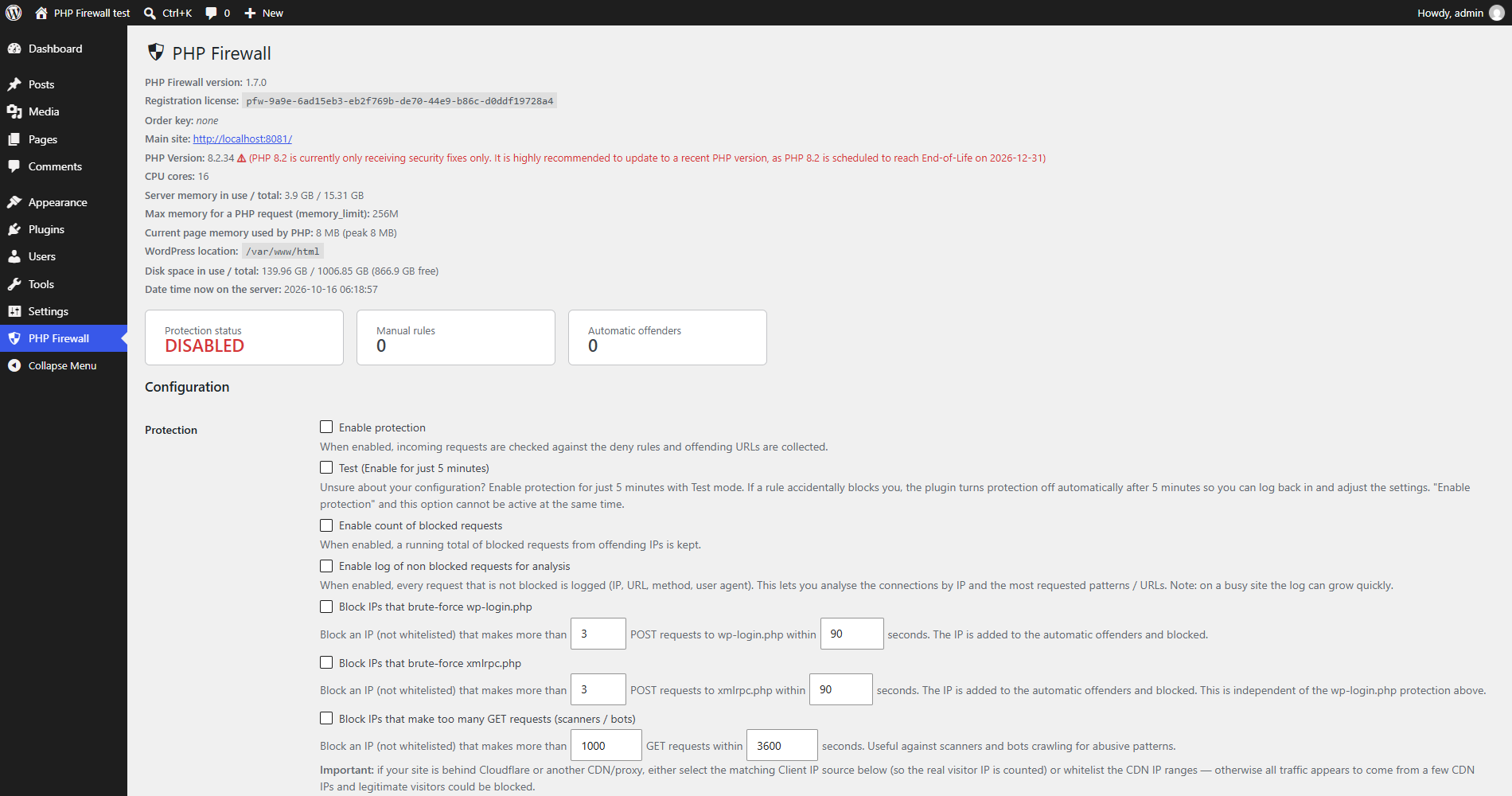
* New "Test (Enable for just 5 minutes)" option next to "Enable protection". It
turns protection on temporarily and disables it automatically after 5 minutes,
so if a rule accidentally locks you out you just wait and log back in — no
database edits. The two options are mutually exclusive (checking one unchecks
the other). Auto-disable happens on the next request, without needing to log in.
= 1.0.20 =
* Usability: the "Automatic offenders" and "Latest requests" sections now have
anchors, and their pagination (Prev/Next) and the request-log verb filter
links carry the anchor, so the page stays scrolled to the same table after a
reload instead of jumping to the top.
* Detection: the built-in pattern ^/docker is now ^/docker/ and a new pattern
^/wp-config.php.bak was added.
= 1.0.19 =
* Detection: added ~200 new built-in scanner/exploit patterns (leaked-secret
files, SQLi probes, webshell names, backup/log files and more). The list is
identical across the WordPress, Drupal and PrestaShop editions; patterns that
would collide with a CMS's own served paths (e.g. Drupal /core/ and
/admin/config, PrestaShop /api/) were deliberately left out.
* Each built-in pattern can now be enabled or disabled individually from a new
collapsible "Built-in patterns" section (all enabled by default) with a text
filter and Enable all / Disable all buttons.
= 1.0.18 =
* New option to block IPs that brute-force xmlrpc.php: more than N POST requests
(default 3) from a non-whitelisted IP within N seconds (default 90) adds the IP
to the automatic offenders and blocks it. Enabled/disabled independently of the
wp-login.php protection and tracked in its own table.
* Detection: the built-in /config/ pattern is now anchored as ^/config/ so it
matches only URLs that start with /config/ (the Drupal edition's settings page
under /admin/config/ is no longer mistakenly blocked).
= 1.0.17 =
* Detection: patterns may now be anchored with a leading "^" so they must match
the start of the URL (e.g. "^/docker" matches "/docker/secrets" but not
"/tag/docker"). Patterns without "^" still match anywhere in the URL.
* Built-in patterns /docker, /backend/ and /public_html/ are now anchored, and
added ^/../, ^/database.sql, ^/mysqldump.sql, ^/data.sql, ^/export.sql,
^/db.sql, ^/dump.sql and ^/backup.sql.
= 1.0.16 =
* Detection: added the /dqgqoeCXckuwPtxov scanner pattern.
* Automatic offenders now store and display the URL that caused each IP to be
flagged (new "Offending URL" column).
* Client IP help: the REMOTE_ADDR line now warns when the connecting IP itself
belongs to a Cloudflare range, suggesting you switch to Cloudflare mode.
= 1.0.15 =
* Security: the Cloudflare CF-Connecting-IP header is now trusted only when the
connecting IP (REMOTE_ADDR) is within Cloudflare's published ranges; otherwise
it is ignored and REMOTE_ADDR is used, preventing header spoofing by direct
connections. Cloudflare ranges are editable in a new textarea.
* Security: X-Forwarded-For / X-Real-IP / Custom header sources are trusted only
from configured trusted proxy ranges (new textarea); empty means never trust.
= 1.0.14 =
* New option to automatically purge request-log entries older than a week
(deleted on each admin page load) to save space, shown when logging is enabled.
* New option to block IPs that brute-force wp-login.php: more than N POST
requests (default 3) from a non-whitelisted IP within N seconds (default 90)
adds the IP to the automatic offenders and blocks it.
= 1.0.13 =
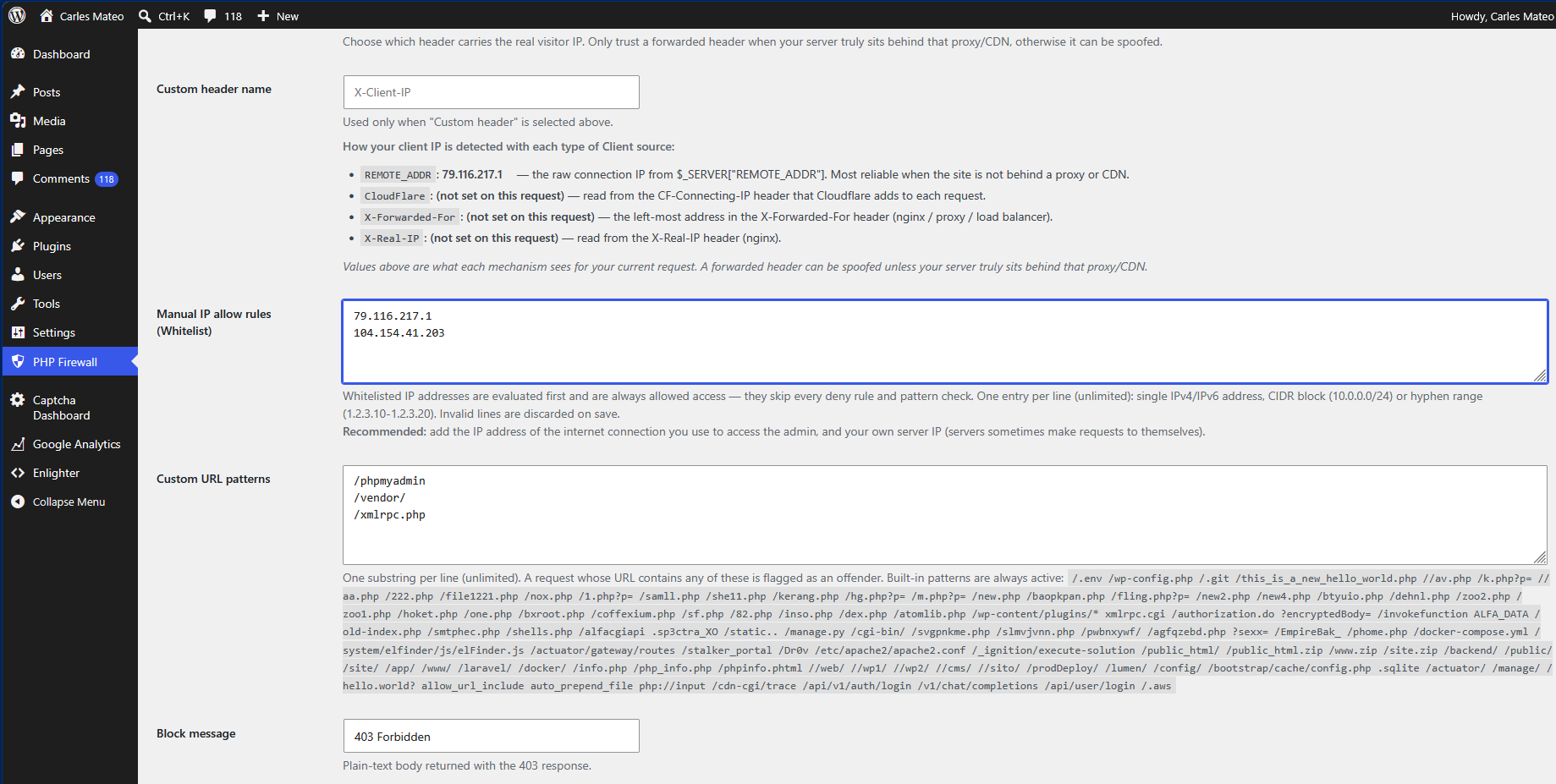
* New "Manual IP allow rules (Whitelist)" setting, evaluated first: matching IPs
are always allowed and skip every deny rule and pattern check. Recommended:
whitelist your admin connection IP and your own server IP.
= 1.0.12 =
* Detection: added /cdn-cgi/trace, /api/v1/auth/login, /v1/chat/completions,
/api/user/login and /.aws.
* Settings: show the PHP Firewall version and the current server date/time.
* Settings: "Logging requests since:" is shown under the log option when enabled.
* Request log: filter the latest requests by verb (all / GET / POST / other).
= 1.0.11 =
* Detection: added ~30 new scanner/exploit patterns (Laravel _ignition,
phpinfo variants, backup archives, php://input, allow_url_include, and more).
Paths that are legitimate on Drupal (/core/, /system/) were intentionally
excluded.
= 1.0.10 =
* Maintenance release. Keeps the version in lockstep with the Drupal edition
(which gained runtime schema self-healing). No functional changes to the
WordPress plugin, which already self-heals its tables on update.
= 1.0.9 =
* Detection: added /Dr0v to the built-in attack patterns.
* Request log: export the top offending IPs (last 24h) and the latest requests
as CSV.
* Request log: the admin's own IP is flagged "(Your IP address)" in the latest
requests and top IPs tables.
= 1.0.8 =
* New option "Enable log of non blocked requests for analysis". Logs each
non-blocked request (datetime, IP, URL, method, user agent) to a new table so
you can analyse connections by IP and the most requested patterns.
* Shows "Logging requests since:" with the activation datetime.
* View the latest requests (paginated, 25 per page) and, on click, the 50 IPs
with the most requests in the last 24 hours (most to least).
= 1.0.7 =
* Detection: added many new scanner/exploit patterns (xmlrpc.cgi,
/invokefunction, ALFA_DATA, /cgi-bin/, /actuator/gateway/routes,
/docker-compose.yml, and more).
* New option "Enable count of blocked requests". When enabled, a
count_blocked_requests counter increments on every blocked request, and the
admin shows "Blocked requests from offending IPs:" with the total.
= 1.0.6 =
* Maintenance release. Keeps the version in lockstep with the Drupal edition.
No functional changes to the WordPress plugin.
= 1.0.5 =
* Registration: the install now registers once with the vendor API and stores
the returned registration_license. If the call fails it is retried silently on
later admin page loads, at most once every 30 minutes. No errors are shown to
the user.
= 1.0.4 =
* Detection: added /wp-content/plugins/* to the built-in attack patterns.
* Settings: the Custom header name field now explains how the client IP is
detected for each Client IP source (REMOTE_ADDR, Cloudflare, X-Forwarded-For,
X-Real-IP) and shows the actual value each mechanism sees for the current
request.
= 1.0.3 =
* Updater: the "update available" state is now also filtered when the update
transient is read (not only when written), so a phantom update notice can no
longer linger on the Plugins/Updates screens once the plugin is up to date.
= 1.0.2 =
* Updater: clicking "Check Again" on the Updates screen now bypasses the 12h
feed cache and refetches immediately, so new releases surface on demand.
* Updater: a stale "update available" entry is now cleared once the plugin is
up to date, fixing a phantom update notice after installing a new version.
= 1.0.1 =
* Import manual IP deny rules from a CSV file. The file is validated in full
before importing (single IPv4/IPv6 addresses, CIDR blocks and hyphen ranges);
if any line is invalid, nothing is imported.
* Automatic offenders list is now paginated, 25 entries per page.
= 1.0.0 =
* Initial commercial release. Full, unrestricted feature set with one-click
updates from a public JSON feed.
* The plugin icon is now shown in Dashboard → Updates and the banner in the
View details pop-up. They are drawn by the installed version, so they appear
from the next update on.
= 1.12.0 =
* Latest requests: two new icons next to each IP to ban it, or its whole
network (Class C /24 for IPv4, /64 for IPv6), as a manual deny rule, after a
confirmation. CDN / trusted-proxy IPs, whitelisted IPs and your own IP are
refused.
* New built-in patterns: /cpresources/, /actions/users/session-info,
^/core/modules/system/, ^/node/1.json, /language/en-GB/en-GB.xml and
/jellyscan-ctrl-.
= 1.11.1 =
* Forensics now logs the payload of POST, PUT, PATCH and DELETE requests.
Multipart bodies sent with PUT, PATCH or DELETE are not stored, only a note
with their size.
* The payload options now say they apply to POST/PUT/PATCH/DELETE.
= 1.11.0 =
* New Custom payload patterns: one substring per line (unlimited), a leading ^
means the payload starts with it. A match bans the IP (reason PAYLOAD-PATTERN).
* Payload patterns, built-in and custom, now scan POST, PUT, PATCH and DELETE
requests.
= 1.10.0 =
* New Storage page (PHP Firewall > Storage): for each firewall table, the
approximate rows and the database space used by data and indexes, the
reclaimable space and the total, with the request log first.
= 1.9.0 =
* New built-in URL patterns: base64_decode(, eval( and system(.
* New option "Block POST Payloads with these built-in patterns:" (enabled by
default), each pattern can be enabled or disabled: base64_decode(, eval(,
system(, exec(, shell_exec(, passthru(, proc_open(, popen(. A match bans the
IP (reason PAYLOAD-PATTERN). Whitelisted IPs and logged-in users who can edit
posts are never scanned; uploaded file contents are not scanned.
* The admin page checks disable_functions (46 recommended functions) and
ffi.enable (preload or 0) and recommends, in red, the php.ini settings when
they are not applied.
= 1.8.0 =
* New PHP2Shell mitigation check (Critical PHP RCE: CVE-2026-109618 and
CVE-2026-109619): the admin page shows in red, with the current values, when
php.ini is not set to session.upload_progress.enabled = 0 and
session.use_strict_mode = 1.
= 1.7.0 =
* Order key: if the plugin folder contains a file order_key.txt (shipped inside
the ZIP of your purchase), its value is read once, stored in the settings (so
it survives upgrades) and sent as order_key when the installation registers.
It is shown under the registration license as "Order key".
= 1.6.9 =
* IPs in Automatic offenders, Latest requests and Top IPs that belong to
Cloudflare, Fastly, Akamai, Amazon CloudFront or to your Trusted proxy IP
ranges are flagged with a warning badge, with a notice above the offenders.
This usually means the Client IP source is REMOTE_ADDR while a CDN connects
(banning that IP can block all your visitors), or the CDN / proxy IP was
compromised.
= 1.6.8 =
* New Client IP sources "Akamai (True-Client-IP)" and "Amazon CloudFront
(CloudFront-Viewer-Address)", with editable "Akamai IP ranges" (pre-filled with
the Akamai Origin IP ACL ranges) and "Amazon CloudFront IP ranges" (pre-filled
with the CLOUDFRONT ranges published by AWS). The header is trusted only when
the connection comes from those ranges.
* "How your client IP is detected" also shows the Akamai and CloudFront values.
= 1.6.7 =
* Automatic offenders now store why the IP was banned in two new fields:
reason_code (RATE-EXCEEDED for the rate limits and the wp-login / xmlrpc
brute-force protections, URL-PATTERN for URL pattern matches; PAYLOAD-PATTERN
reserved) and reason_for_ban (e.g. "rate: POST > 10/11800s").
* Offending URL now always keeps the latest URL requested, also for rate-limit
bans, displayed as "rate: POST > 10/11800s last url: /the/url".
= 1.6.6 =
* New built-in patterns: /config.yaml, /config.yml, /config.yml.back,
/config.yml.bck, /services.yaml, /services.yml, /parameters.yaml,
/%2f%2eaws%2fcredentials and /%2eenv (double-encoded probes), /.terraform/,
/terraform.tfstate, /c5_7alk07dml, /.env.local.php.back and /.env.local.php.bck.
* The copy-to-clipboard icon now always stays on the same line as the IP.
= 1.6.5 =
* No functional changes in the WordPress edition (version kept in step with the
Ibexa edition, which gains login brute-force protection and a GraphQL rate
limit).
= 1.6.4 =
* New Client IP source "Fastly (Fastly-Client-IP)" and new editable "Fastly IP
ranges", pre-filled with Fastly's published IPv4 and IPv6 ranges
(https://api.fastly.com/public-ip-list). The header is trusted only when the
connection comes from those ranges. Set req.http.Fastly-Client-IP = client.ip
in your Fastly VCL so visitors cannot spoof it.
= 1.6.3 =
* New built-in pattern: wp-content/plugins/wp2shell_
* The Automatic offenders list shows the Method (GET, POST...) of the offending
request.
= 1.6.2 =
* The Automatic offenders table now uses the full width of the page, like
Latest requests.
* A copy-to-clipboard icon next to the IP in the Automatic offenders and Latest
requests tables.
= 1.6.1 =
* The admin page shows the WordPress location and the disk space in use / total
of its partition, with a red "Low disk space on WordPress partition" alert when
less than 10% or less than 1 GB is free.
* The "Hide requests from my IP address" filter of the latest requests is now
remembered per user.
= 1.6.0 =
* New Host column in Latest requests and Automatic offenders: the host
requested by the client. Useful for WordPress Multisite and to detect a
server answering requests for several domains. Also in the request-log CSV.
* Registration now sends main_site (the site URL), wp_multisite and
wp_multisite_sites. The admin page shows "Main site:" under the
registration license (with the number of sites on Multisite).
* Multisite: the PHP Firewall page stays in the same place but is only
available to super admins; sub-site administrators could previously change
the network-wide firewall and read all the logs. The network registers once.
See docs/wordpress-multisite.md.
= 1.5.1 =
* New Forensics options for IPs in the Manual IP allow rules (Whitelist), both
enabled by default: "Do not store Headers or Payloads for IPs in the Manual IP
allow rules (Whitelist)" and "Always redact sensitive information for IPs in
the Manual IP allow rules (Whitelist)".
* New built-in pattern: ^/owa/auth
= 1.5.0 =
* New Forensics options (disabled by default): "Log the payload of the POST
requests" and "Log the headers sent to all the requests" (including the headers
added by Cloudflare or other proxies). The data is stored with the request log
and with the automatic offenders. Payloads up to 64 KB, headers up to 16 KB;
uploaded files only as name, type and size.
* New option "Redact sensitive information, like passwords, tokens, Cookies..."
(enabled by default). When disabled, nothing is redacted and passwords, Cookies
and tokens are stored as sent. Storing sensitive information may require
complying with Data Protection laws (such as the GDPR). See
docs/forensics-logging.md.
= 1.4.0 =
* IPv6 clients are now banned and counted by network prefix. Automatic bans,
the GET/POST rate limits and the wp-login / xmlrpc brute-force counters apply
to the client's whole /64 by default, so rotating the IPv6 interface ID
(privacy extensions) no longer evades a ban. New setting "When banning or
counting an IPv6 client, use": /64 (default), /56, /48 or exact address.
IPv4 is unchanged, and bans stored as exact addresses before the upgrade keep
working. See docs/ipv6-whitelisting-and-blocking.md.
= 1.3.1 =
* Settings: shows the PHP version with an end-of-life / update warning, the
number of CPU cores (warning when only one core is detected), server memory in
use / total, the PHP memory_limit and the memory used by the current page.
* Detection: added /0vso2ticzbye, ^/?dns=, ^/remote/login, ^/dqgqoeCXckuwPtxov,
000000000000000000000, /chat/completions, ^/sendgrid.env, ^/wp-config.txt and
.strip.
= 1.3.0 =
* New "When an offender is detected" setting: keep the permanent ban (default) or
ban for 1h, 2h, 4h, 8h, 12h, 24h, a week, a month or a year. Time-limited bans
expire automatically and the IP is allowed again.
* New option "Automatically remove expired bans from the list" (default off);
when off, expired bans stay listed as "Expired" but no longer block.
* Automatic offenders table now shows an "Expires" column (Never / date / Expired).
* Note: ufw / CSV exports still emit permanent rules — a time-limited ban exported
to ufw becomes a permanent OS-level block.
= 1.2.1 =
* Request log: new checkbox "Hide requests from my IP address" (shows your admin
connection IP), so your own admin traffic can be excluded from the list.
* Detection: added ^/admin/config.php and ^/phpMyadmin_bak/.
= 1.2.0 =
* Request log: filter the latest requests by IP address or part of it (e.g.
"192.168"), with a notice showing which IP mask is being displayed.
* New option "Block IPs that make too many GET requests" (scanners / bots):
more than N GET requests within N seconds (default 1000 / 3600) flags and
blocks the IP. Disabled by default. Remember to whitelist your CDN IP ranges.
* New option "Block IPs that make too many POST requests" (password-guessing /
spam bots): more than N POST requests within N seconds (default 100 / 3600).
Disabled by default.
* Detection: added /google-api-private-key.json, proc/self/environ and ..%2f.
= 1.1.0 =
* Detection: added the patterns invokefunction, =call_user_func_array,
php://filter and convert.base64 (ThinkPHP RCE and PHP filter-chain / LFI
probes). They match anywhere in the URL and are not legitimate WordPress,
Drupal or PrestaShop paths.
= 1.0.21 =
* New "Test (Enable for just 5 minutes)" option next to "Enable protection". It
turns protection on temporarily and disables it automatically after 5 minutes,
so if a rule accidentally locks you out you just wait and log back in — no
database edits. The two options are mutually exclusive (checking one unchecks
the other). Auto-disable happens on the next request, without needing to log in.
= 1.0.20 =
* Usability: the "Automatic offenders" and "Latest requests" sections now have
anchors, and their pagination (Prev/Next) and the request-log verb filter
links carry the anchor, so the page stays scrolled to the same table after a
reload instead of jumping to the top.
* Detection: the built-in pattern ^/docker is now ^/docker/ and a new pattern
^/wp-config.php.bak was added.
= 1.0.19 =
* Detection: added ~200 new built-in scanner/exploit patterns (leaked-secret
files, SQLi probes, webshell names, backup/log files and more). The list is
identical across the WordPress, Drupal and PrestaShop editions; patterns that
would collide with a CMS's own served paths (e.g. Drupal /core/ and
/admin/config, PrestaShop /api/) were deliberately left out.
* Each built-in pattern can now be enabled or disabled individually from a new
collapsible "Built-in patterns" section (all enabled by default) with a text
filter and Enable all / Disable all buttons.
= 1.0.18 =
* New option to block IPs that brute-force xmlrpc.php: more than N POST requests
(default 3) from a non-whitelisted IP within N seconds (default 90) adds the IP
to the automatic offenders and blocks it. Enabled/disabled independently of the
wp-login.php protection and tracked in its own table.
* Detection: the built-in /config/ pattern is now anchored as ^/config/ so it
matches only URLs that start with /config/ (the Drupal edition's settings page
under /admin/config/ is no longer mistakenly blocked).
= 1.0.17 =
* Detection: patterns may now be anchored with a leading "^" so they must match
the start of the URL (e.g. "^/docker" matches "/docker/secrets" but not
"/tag/docker"). Patterns without "^" still match anywhere in the URL.
* Built-in patterns /docker, /backend/ and /public_html/ are now anchored, and
added ^/../, ^/database.sql, ^/mysqldump.sql, ^/data.sql, ^/export.sql,
^/db.sql, ^/dump.sql and ^/backup.sql.
= 1.0.16 =
* Detection: added the /dqgqoeCXckuwPtxov scanner pattern.
* Automatic offenders now store and display the URL that caused each IP to be
flagged (new "Offending URL" column).
* Client IP help: the REMOTE_ADDR line now warns when the connecting IP itself
belongs to a Cloudflare range, suggesting you switch to Cloudflare mode.
= 1.0.15 =
* Security: the Cloudflare CF-Connecting-IP header is now trusted only when the
connecting IP (REMOTE_ADDR) is within Cloudflare's published ranges; otherwise
it is ignored and REMOTE_ADDR is used, preventing header spoofing by direct
connections. Cloudflare ranges are editable in a new textarea.
* Security: X-Forwarded-For / X-Real-IP / Custom header sources are trusted only
from configured trusted proxy ranges (new textarea); empty means never trust.
= 1.0.14 =
* New option to automatically purge request-log entries older than a week
(deleted on each admin page load) to save space, shown when logging is enabled.
* New option to block IPs that brute-force wp-login.php: more than N POST
requests (default 3) from a non-whitelisted IP within N seconds (default 90)
adds the IP to the automatic offenders and blocks it.
= 1.0.13 =
* New "Manual IP allow rules (Whitelist)" setting, evaluated first: matching IPs
are always allowed and skip every deny rule and pattern check. Recommended:
whitelist your admin connection IP and your own server IP.
= 1.0.12 =
* Detection: added /cdn-cgi/trace, /api/v1/auth/login, /v1/chat/completions,
/api/user/login and /.aws.
* Settings: show the PHP Firewall version and the current server date/time.
* Settings: "Logging requests since:" is shown under the log option when enabled.
* Request log: filter the latest requests by verb (all / GET / POST / other).
= 1.0.11 =
* Detection: added ~30 new scanner/exploit patterns (Laravel _ignition,
phpinfo variants, backup archives, php://input, allow_url_include, and more).
Paths that are legitimate on Drupal (/core/, /system/) were intentionally
excluded.
= 1.0.10 =
* Maintenance release. Keeps the version in lockstep with the Drupal edition
(which gained runtime schema self-healing). No functional changes to the
WordPress plugin, which already self-heals its tables on update.
= 1.0.9 =
* Detection: added /Dr0v to the built-in attack patterns.
* Request log: export the top offending IPs (last 24h) and the latest requests
as CSV.
* Request log: the admin's own IP is flagged "(Your IP address)" in the latest
requests and top IPs tables.
= 1.0.8 =
* New option "Enable log of non blocked requests for analysis". Logs each
non-blocked request (datetime, IP, URL, method, user agent) to a new table so
you can analyse connections by IP and the most requested patterns.
* Shows "Logging requests since:" with the activation datetime.
* View the latest requests (paginated, 25 per page) and, on click, the 50 IPs
with the most requests in the last 24 hours (most to least).
= 1.0.7 =
* Detection: added many new scanner/exploit patterns (xmlrpc.cgi,
/invokefunction, ALFA_DATA, /cgi-bin/, /actuator/gateway/routes,
/docker-compose.yml, and more).
* New option "Enable count of blocked requests". When enabled, a
count_blocked_requests counter increments on every blocked request, and the
admin shows "Blocked requests from offending IPs:" with the total.
= 1.0.6 =
* Maintenance release. Keeps the version in lockstep with the Drupal edition.
No functional changes to the WordPress plugin.
= 1.0.5 =
* Registration: the install now registers once with the vendor API and stores
the returned registration_license. If the call fails it is retried silently on
later admin page loads, at most once every 30 minutes. No errors are shown to
the user.
= 1.0.4 =
* Detection: added /wp-content/plugins/* to the built-in attack patterns.
* Settings: the Custom header name field now explains how the client IP is
detected for each Client IP source (REMOTE_ADDR, Cloudflare, X-Forwarded-For,
X-Real-IP) and shows the actual value each mechanism sees for the current
request.
= 1.0.3 =
* Updater: the "update available" state is now also filtered when the update
transient is read (not only when written), so a phantom update notice can no
longer linger on the Plugins/Updates screens once the plugin is up to date.
= 1.0.2 =
* Updater: clicking "Check Again" on the Updates screen now bypasses the 12h
feed cache and refetches immediately, so new releases surface on demand.
* Updater: a stale "update available" entry is now cleared once the plugin is
up to date, fixing a phantom update notice after installing a new version.
= 1.0.1 =
* Import manual IP deny rules from a CSV file. The file is validated in full
before importing (single IPv4/IPv6 addresses, CIDR blocks and hyphen ranges);
if any line is invalid, nothing is imported.
* Automatic offenders list is now paginated, 25 entries per page.
= 1.0.0 =
* Initial commercial release. Full, unrestricted feature set with one-click
updates from a public JSON feed.